
CRM / Customer Management
Every client, on one record
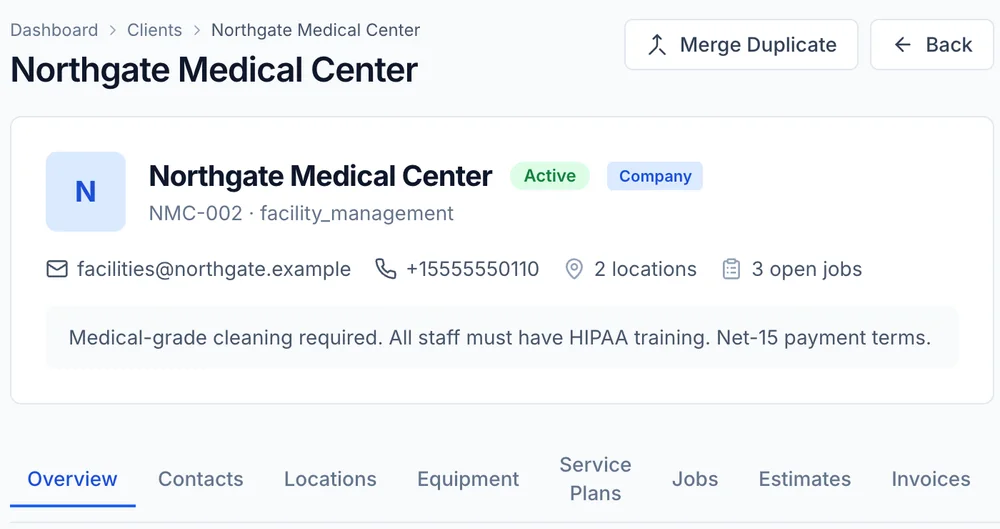
A client's phone number in one text thread, their address on a sticky note and their last invoice in a spreadsheet is how repeat customers get treated like strangers. FieldRova keeps contacts, properties, equipment, jobs and billing together on one client record.
Inside the record
Built for repeat customers and multi-property clients
The customer called again. Who are they?
Open the client and the answer is already there: billing contact, phone, open jobs, notes and the last thing you did for them. The person answering the phone stops asking the customer to repeat their story.
Landlords, property managers and second homes
One client can own several properties. Each service location keeps its own address and job history, and the equipment you service there stays on that location, so the crew knows what they are walking into.
Last year's repair is one tab away
Every job, estimate and invoice for the client sits on its own tab. Before you quote the repeat leak or the second compressor, you can see what was done, what was charged and whether it was paid.
Calls logged, numbers protected
Calls placed through Rova Phone show up on the client record. When a technician calls a client through FieldRova, masking keeps the client's real number off the technician's screen.
Who sees what
Owners see every client. Technicians see theirs.
Owners and managers can open any client in the company. A technician sees only the clients on their own assigned jobs, so your full customer list never rides around in every truck.
- Contacts, service locations and equipment, each added once and kept under the client
- Jobs, Estimates and Invoices tabs, plus Credits and a Statement you can export to CSV
- A Calls tab and a Files tab on the same record
- Service plans enrolled right from the client record
- Leads tracked in a pipeline, then converted into a client with an optional first job
- Merge duplicate clients and import your list from a CSV file
The leads pipeline comes with the Pro plan and service plans with Ultimate. See Pricing.
Stop hunting for the customer's history
Create an account and add your first clients, or ask our team how to bring in the list you already keep in a spreadsheet.